Invisible Solana SPL tokens (USDC, BONK, JUP) or 0 SOL balances on Ledger occur when third-party wallet interfaces (Phantom, Solflare, Backpack) scan a different derivation path than the one where tokens were received. Ledger Live defaults to the standard BIP-44 path m/44'/501'/0'/0', whereas legacy Solflare and older Phantom instances use m/44'/501'/0'. Toggling derivation paths in wallet settings exposes all accounts safely.
To calculate and verify Hierarchical Deterministic paths across non-EVM chains, use our interactive Derivation Path Inspector Tool. For related multi-chain derivation issues, see our guides on Phantom wallet Ledger hidden accounts and Ledger Live zero balance BIP-44 recovery.
Cryptographic Root Cause: Ed25519 Derivation Discrepancies
Unlike Bitcoin and Ethereum—which utilize secp256k1 curves with standard BIP32 hierarchical deterministic keys—Solana utilizes the Edwards-curve Digital Signature Algorithm (Ed25519) governed by SLIP-0010.
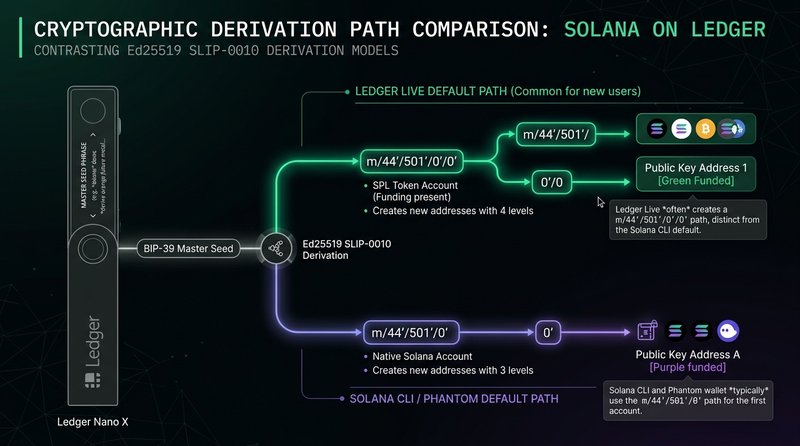
The Three Competing Derivation Schemes
- Ledger Live Standard (4-Hardened + 1 Unhardened): $$\text{m / 44’ / 501’ / 0’ / 0’}$$ Ledger Live applies an additional change index to Solana accounts, mimicking classic BIP44 Bitcoin structures.
- Solana CLI & Native Standard (3-Hardened):
$$\text{m / 44’ / 501’ / 0’}$$
The official Solana Foundation command-line interface and standard SDK (
@solana/web3.js) derive public keys using only three hardened levels. - Deprecated Web3 Derivation (Legacy Sollet / Phantom): $$\text{m / 44’ / 501’ / 0’ / 0}$$ (or unhardened account indices).
Because Ed25519 one-way elliptic curve point multiplication derives completely disparate base addresses for each path, each address possesses unique Associated Token Account (ATA) program derived addresses (PDAs) for tokens:
$$\text{ATA} = \text{findProgramAddress}(\left[\text{WalletPubKey}, \text{TokenProgramID}, \text{MintAddress}\right])$$
If the derived WalletPubKey differs by even a single derivation index, the resulting ATA address is totally different, showing a balance of 0.
Step-by-Step Recovery Protocol
To locate and consolidate your stranded SPL tokens and SOL balances without ever exposing your 24-word recovery phrase, execute the following non-destructive procedure.
1. Close Conflicting Software
Close Ledger Live desktop completely. Ledger Live maintains an exclusive WebUSB / HID communication lock on the device which interferes with browser WebHID bridges.
2. Connect Ledger via Solflare Advanced Derivation Selector
Solflare provides the most flexible derivation path selector for hardware devices:
- Open Solflare in Chrome, Brave, or Edge.
- Click Add Account $\rightarrow$ Connect Hardware Wallet $\rightarrow$ Ledger.
- Open the Solana application on your physical Ledger device (ensure it displays “Application is ready”).
- When prompted by Solflare, click on Derivation Path dropdown menu:
- Path A:
m/44'/501'/0'/0'(Ledger Live Default) - Path B:
m/44'/501'/0'(Solana CLI & Phantom Default) - Path C:
m/44'/501'/0'with Sub-accounts (BIP44)
- Path A:
- Solflare will scan the addresses across all three derivation trees. Locate the address displaying your positive SPL token balance and check its box.
[Solflare Address Discovery Preview]
Path: m/44'/501'/0'/0'  -> 7xKp...39La (SOL: 0.05, USDC: 14,250.00)  <-- FUNDED!
Path: m/44'/501'/0'     -> 3mRt...92Fq (SOL: 0.00, SPL: 0)
Path: m/44'/501'/1'/0'  -> 9vWq...11Zp (SOL: 0.00, SPL: 0)
3. Programmatic Account Inspection via Solana CLI
If you prefer command-line verification via node scripts, use the @solana/web3.js library to inspect token balances across both paths without moving funds:
// scripts/solanaDerivationScanner.ts
import { Connection, PublicKey } from '@solana/web3.js';
import { TOKEN_PROGRAM_ID } from '@solana/spl-token';

const RPC_ENDPOINT = 'https://api.mainnet-beta.solana.com';
const connection = new Connection(RPC_ENDPOINT, 'confirmed');

async function scanWalletTokens(baseAddressString: string) {
  const owner = new PublicKey(baseAddressString);
  console.log(`\nScanning Token Accounts for Owner: ${owner.toBase58()}`);

  const tokenAccounts = await connection.getParsedTokenAccountsByOwner(owner, {
    programId: TOKEN_PROGRAM_ID,
  });

  if (tokenAccounts.value.length === 0) {
    console.log('No SPL token accounts found under this base address.');
    return;
  }

  for (const { pubkey, account } of tokenAccounts.value) {
    const parsedInfo = account.data.parsed.info;
    const mint = parsedInfo.mint;
    const amount = parsedInfo.tokenAmount.uiAmountString;
    console.log(`- ATA: ${pubkey.toBase58()} | Mint: ${mint} | Balance: ${amount}`);
  }
}

// Pass your respective derived public keys
// scanWalletTokens("7xKp...39La");
4. Consolidate and Standardize Tokens
Once you have identified your funded derivation path in Solflare:
- Copy the public address of your preferred primary account (e.g., your Ledger Live address
m/44'/501'/0'/0'). - Transfer your SPL tokens from the secondary derivation address to your primary address.
- Once all SPL tokens are transferred, close the token accounts in Solflare to recover the ~0.002039 SOL rent deposit per token account back to your wallet.
Derivation Path Compatibility Matrix
| Wallet / Client | Default Derivation Path | Multi-Path Support | Notes |
|---|---|---|---|
| Ledger Live | m/44'/501'/0'/0' | No (Strict) | Enforces 4-hardened + 1 unhardened index; does not scan CLI paths. |
| Phantom | m/44'/501'/0' or m/44'/501'/0'/0' | Yes (Manual toggle) | Allows switching between “BIP44 Standard” and “Ledger Live” paths. |
| Solflare | Both + Custom paths | Yes (Full discovery) | Automatically scans top addresses across all three standards. |
| Solana CLI | m/44'/501'/0' | Via --keypair usb://ledger?key=0 | Requires explicit query string for sub-accounts. |
Frequently Asked Questions
Q: Why did Ledger Live design its path differently than the Solana Foundation CLI?
When Ledger added Solana support to Ledger Live, their engineering protocol required consistent 5-level BIP44 derivation paths (m / 44' / coin_type' / account' / change / address_index) across all supported chains. The Solana CLI developers earlier adopted a 3-level hardened path, creating this ecosystem schism.
Q: Does exposing the derivation path compromise my hardware wallet security?
No. Derivation paths are standardized mathematical formulas, not secrets. Your private keys remain safely locked inside the Ledger Secure Element chip (ST33). Only your public keys and balances are exposed for blockchain verification.
Q: What happens to my staked SOL (Native Stake Accounts)?
Native stake accounts are independent on-chain accounts whose stake authorities point to your base wallet address. If your stake authority was set under m/44'/501'/0', you must connect using that exact path to sign deactivation and withdrawal transactions.