To resolve Coinbase Passkey Not Available on Desktop Fix (Platform Authenticator), getting. Ensure all derivation paths, environment parameters, and cryptographic signatures are verified client-side using deterministic tools before broadcasting live transactions.
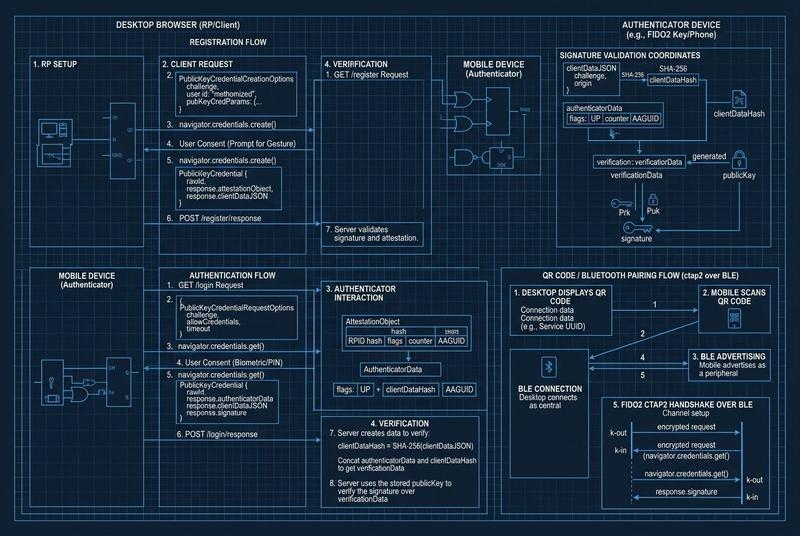
If you encounter a “passkey not available” error on the Coinbase Smart Wallet desktop interface, the local WebAuthn protocol has failed to detect a linked secure element. To diagnose your browser’s platform authenticator capabilities immediately, run our client-side WebAuthn & Passkey Debugger. To resolve this immediately, bypass the local prompt by selecting “Use a different device” to summon the cross-device QR code, or ensure Bluetooth is actively broadcasting on both your mobile device and desktop machine.
Diagnostic Transport JSON
{
  "error": "NotAllowedError",
  "message": "The operation either timed out or was not allowed.",
  "transport": "hybrid",
  "reason": "Local enclave missing; Bluetooth transport failed."
}
Architectural Context: WebAuthn Transports and CTAP2 Hybrid Flows
The WebAuthn API (Web Authentication) is not a monolithic protocol; it is an orchestration layer between a Relying Party (RP) and an Authenticator. In the context of the Coinbase Smart Wallet, the browser acts as the Client, and the smart contract on-chain (Base/Ethereum) acts as the final arbiter of the signature. When the error “Passkey Not Available” triggers on desktop, it signifies a failure in the CTAP2 (Client to Authenticator Protocol) handshake.
The Role of Secp256r1 (P-256) and @noble/curves
Unlike traditional EOA (Externally Owned Account) wallets that use secp256k1 (the Koblitz curve), passkeys leverage the secp256r1 (NIST P-256) curve. This choice is critical because mobile secure enclaves (Apple’s Secure Enclave, Android’s StrongBox) natively support P-256 for hardware-backed key generation.
When a signature is requested, the Authenticator generates an authenticatorData object and a signature using the P-256 algorithm. Tools like @noble/curves are often used in the backend or within client-side SDKs to validate these signatures before they are submitted to a bundler in an ERC-4337 transaction. The “Not Available” error often stems from the browser’s inability to route the navigator.credentials.get() call to a device capable of signing with these specific hardware primitives.
Hybrid Transport (caBLE) Mechanics
Coinbase Smart Wallets frequently rely on “Hybrid” transport, formerly known as caBLE (Cloud-Assisted Bluetooth Low Energy). This flow is complex:
- The Desktop Browser generates a temporary WebSocket URL via a relay server.
- It encodes this URL into a QR code.
- The Mobile Device scans the QR, establishing a Bluetooth Low Energy (BLE) advertisement.
- Proximity is verified (to prevent remote phishing), and an encrypted tunnel is established using an ad-hoc key exchange.
If the desktop machine lacks a BLE radio or if the browser’s implementation of the WebAuthn Hybrid extension is disabled (common in hardened Chromium builds), the PublicKeyCredential request fails. This isn’t a failure of the private key, but a failure of the “plumbing” between the browser and the mobile enclave.
Deep Dive: Smart Contract Signature Verification
From a smart contract perspective, the signature returned by a passkey isn’t a simple (r, s, v) tuple. It includes a clientDataJSON and authenticatorData. The contract must:
- Parse the
clientDataJSONto verify thechallenge,origin, andtype. - Hash the concatenation of
authenticatorDataand the SHA-256 hash ofclientDataJSON. - Use a RIP-7212 precompile (on supported L2s like Base) or a specialized library (like
FreshCryptoLib) to verify the P-256 signature against the stored public key.
If you are debugging this via viem or ethers, you can simulate the validation by extracting the coordinates $(x, y)$ from the COSE-encoded public key. If the browser returns “Not Available,” the logic never reaches the simulation phase because the get() promise rejects before the user can even provide biometric consent.
Production-Grade Prevention: Enterprise Environment Schemas
To prevent these failures in a production or corporate setting, DevOps teams must implement standardized environment configurations for Web3 passkey interactions.
1. Client-Side Transport Policy
Implement a fallback mechanism in your frontend code that detects the absence of a local authenticator. Use PublicKeyCredential.isUserVerifyingPlatformAuthenticatorAvailable() to determine if you should default to the “Cross-Platform” (Security Key) or “Hybrid” (Mobile) flow.
// Example Transport Fallback Logic
const checkAuthenticator = async () => {
  const isLocalAvailable = await PublicKeyCredential.isUserVerifyingPlatformAuthenticatorAvailable();
  if (!isLocalAvailable) {
    console.warn("Local enclave missing. Forcing Hybrid/QR flow.");
    // Update UI to guide user toward mobile scanning
  }
};
2. Browser Environment Schema
For developers using automated testing (Playwright or Cypress), ensure the WebAuthn virtual authenticator is correctly configured to support the P-256 curve. Without this, CI/CD pipelines will consistently throw the “Not Available” error.
| Parameter | Configuration |
|---|---|
| Protocol | CTAP2 |
| Transport | Internal / USB |
| Verification | Required |
| Algorithm | -7 (ES256 / P-256) |
3. Security Policies for Recovery
If a user loses access to their mobile device (their primary authenticator), the “Not Available” error becomes permanent. A production-grade setup MUST include:
- Alternative Signers: Registering at least one secondary passkey (e.g., a hardware YubiKey).
- Social Recovery: Utilizing ERC-4337 recovery modules to allow a guardian (another wallet) to reset the passkey public key stored in the smart contract.
- Backup Keys: Exporting a BIP-39 seed if the wallet provides a fallback mnemonic, though many “pure” passkey wallets omit this for security.
Advanced FAQ: Deep Technical Insights
How does the ‘origin’ check in WebAuthn affect Coinbase Smart Wallet?
The WebAuthn API enforces a strict origin check. If you registered your passkey on coinbase.com but are trying to sign a transaction on a different dApp domain that hasn’t correctly implemented a shared top-level origin or doesn’t use the Coinbase SDK as an intermediary, the browser will report that no passkey is available for that specific domain. This is a security feature to prevent cross-site signature requests.
Can I use @noble/curves to debug a failed P-256 signature?
Yes. If you manage to retrieve a signature but the contract rejects it, you can use the @noble/curves/p256 library to verify the signature manually against the public key coordinates. If manual verification passes but the contract fails, the issue is likely in the clientDataJSON hashing or the handling of the s value (which must be within a specific range to prevent malleability).
Why do some Chromium-based browsers fail while Safari succeeds?
Safari has deep integration with the Apple Secure Enclave and iCloud Keychain, allowing for seamless cross-device synchronization. Chromium on Windows or Linux often relies on the operating system’s WebAuthn implementation (Windows Hello or libfido2). If the OS-level handshake is not configured to handle “hybrid” transports, Chromium will throw a NotAllowedError, whereas Safari would have automatically prompted for an iPhone-based signature.
Advanced Manual: Bluetooth Troubleshooting for Web3 Signatures
If you are trapped in a “Not Available” loop on a desktop machine:
- Clear the CTAP State: Go to your browser settings and remove any “Stale” authenticators associated with the domain.
- Toggle Radio States: Turn Bluetooth OFF and then ON on both the desktop and the mobile device. This forces a re-broadcast of the BLE advertisement.
- Inspect WebAuthn Internals: In Chrome, navigate to
chrome://device-logto see if the BLE handshake is timing out or if thehybridtransport is being rejected by the OS. - Hardware Fallback: If wireless transport is unreliable, connect your mobile device via a USB cable. Modern versions of Chrome can sometimes utilize USB-based CTAP transport for mobile devices, bypassing BLE entirely.
[!TIP] Companion Diagnostic Guide: If experiencing related infrastructure failures, cross-reference symptoms with our technical breakdown on Windows Hello Passkeys in TPM 2.0: Non-Exportable Private Key & Enclave Lock Fix.