Seeing a zero balance for Bitcoin Ordinals, Inscriptions, or Taproot assets after connecting a Ledger device occurs because Ledger Live does not natively parse BIP-86 single-key script paths (m/86'/0'/0'), scanning only legacy BIP-44, BIP-49, or BIP-84 trees instead. Connecting your Ledger hardware device to Sparrow Wallet and selecting the dedicated Taproot (P2TR) script policy locates your unspent transaction outputs instantly without exposing seed words.
To verify account paths and script types offline, launch our interactive Derivation Path Inspector Tool. If your funds were created on legacy Bitcoin paths, consult our Ledger Live zero balance BIP-44/84 recovery guide and Ledger Electrum custom derivation recovery.
Technical Root Cause: BIP-86 vs BIP-84 Derivation Structures
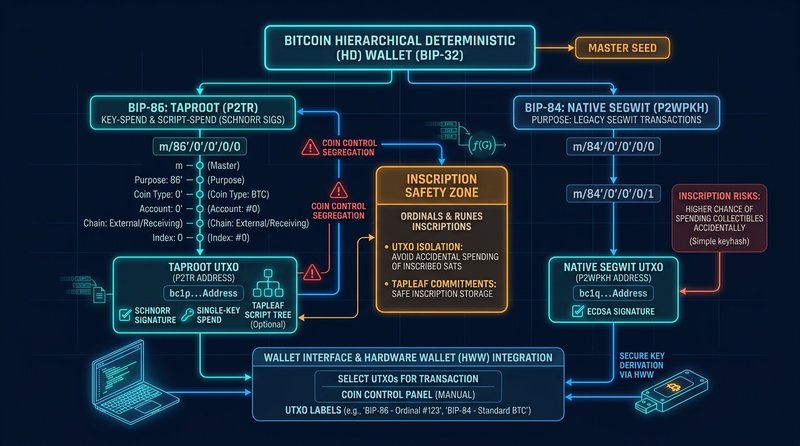
Bitcoin Hierarchical Deterministic (HD) wallets derive cryptographic keypairs from a single master seed using standardized BIP purposes:
- BIP-44 (Legacy P2PKH):
m/44'/0'/0'/0/i(Addresses begin with1...) - BIP-49 (Nested SegWit P2SH-P2WPKH):
m/49'/0'/0'/0/i(Addresses begin with3...) - BIP-84 (Native SegWit P2WPKH):
m/84'/0'/0'/0/i(Addresses begin withbc1q...) - BIP-86 (Taproot P2TR):
m/86'/0'/0'/0/i(Addresses begin withbc1p...)
Under BIP-86, Taproot utilizes BIP-340 Schnorr signatures over the secp256k1 elliptic curve, tweaking the internal public key $P$ with the Merkle root of a Tapscript tree:
$$Q = P + \text{int}(\text{hash}_{\text{TapTweak}}(P \parallel m)) \cdot G$$
When third-party interfaces (such as UniSat, Xverse, Magic Eden, or Sparrow Wallet) communicate with a Ledger device via the Bitcoin App, they may request public keys at specific custom account indexes (e.g., m/86'/0'/0'/0/0 vs m/86'/0'/1'/0/0). If Ledger Live is synced afterwards, its internal node scanner stops querying after evaluating 20 consecutive empty addresses (the standard BIP-44 gap limit). If your funds reside on a secondary account index or non-standard change branch (m/86'/0'/0'/1/*), Ledger Live simply marks the account as nonexistent.
Critical Danger: The Inscription Burn Hazard
Standard wallet interfaces treat all satoshis fungibly and select transaction inputs based on FIFO or fee-minimization heuristics. Because Ledger Live lacks satoshi-level coin control and UTXO freezing, initiating any outgoing transaction risks selecting the inscribed UTXO as input and sending your rare digital artifact to a miner as transaction fee or mixing it into change.
Step-by-Step Air-Gapped Recovery Protocol via Sparrow Wallet
To safely recover and isolate your Taproot balance without ever typing your 24-word recovery phrase onto a computer, connect your Ledger hardware device to Sparrow Wallet (an open-source, air-gapped Bitcoin coordinator with native BIP-86 and coin control support).
Phase 1: Prepare the Hardware Interface
- Connect your Ledger Nano S Plus, Nano X, or Stax to your workstation via direct USB (avoid unpowered USB hubs).
- Unlock your device with your PIN and open the Bitcoin App on the Ledger screen. Ensure the app version is >= 2.2.0.
- Close Ledger Live entirely to release the WebUSB/HID device handle.
Phase 2: Create a Hardware-Connected Taproot Vault in Sparrow
- Launch Sparrow Wallet and select File -> New Wallet.
- Name the wallet
Ledger-Taproot-Recovery. - In the Settings tab:
- Script Type: Select
Taproot (P2TR). - Notice that the Derivation Path automatically locks to
m/86'/0'/0'.
- Script Type: Select
- Click Connected Hardware Wallet.
- Select Scan… under the Ledger column. Sparrow will query the device via HWI (Hardware Wallet Interface) and extract the Master Public Key (
xpub/zpub).
# Debugging HWI detection via terminal (optional verification)
$ hwi enumerate
[
  {
    "type": "ledger",
    "path": "\\\\?\\hid#vid_2c97&pid_0004#...",
    "needs_pin_sent": false,
    "needs_passphrase_sent": false,
    "fingerprint": "73c5da0a"
  }
]- Click Import Keystore. Sparrow displays your account’s Master Extended Public Key starting with
xpub.... - Click Apply. Set an optional local database password to protect your UTXO labels.
Phase 3: Inspecting Derivation Indexes & Scanning Beyond the Gap Limit
Once connected, Sparrow connects to an Electrum server or Bitcoin Core node and loads all historical UTXOs. If your balance is still showing 0:
- Navigate to the Addresses tab in Sparrow.
- Verify that the listed
bc1p...addresses match the address you originally transferred funds to. - If your destination address does not appear in the first 20 rows, increase the gap limit:
- Navigate to Settings -> Script Type.
- Under Derivation Path, adjust the account index from
m/86'/0'/0'tom/86'/0'/1'(Account #1) orm/86'/0'/2'(Account #2). - Re-scan to detect funds deposited under secondary application accounts.
Phase 4: Freezing Inscribed UTXOs with Coin Control
To safeguard your assets:
+---------------------------------------------------------------+
|                      SPARROW COIN CONTROL                     |
|                                                               |
|  [TxID: 4a2f...]  Output 0: 0.00010000 BTC  [FROZEN: ORDINAL] |
|  [TxID: 8e1b...]  Output 1: 0.05200000 BTC  [UNFROZEN: GAS]   |
+---------------------------------------------------------------+- Navigate to the UTXOs tab.
- Locate the specific transaction output that received the Inscription (typically a small satoshi value, such as 546 sats or 10,000 sats).
- Right-click the UTXO and select Freeze. This prevents Sparrow from ever selecting this UTXO as an input in standard spending transactions.
- Label the UTXO explicitly (e.g.,
Ordinal Inscription #841022). - You can now safely transact your remaining unrestricted Bitcoin without risking accidental asset destruction.
Verification & Permanent Sync Resolution
Once your Taproot balance is verified in Sparrow:
- You can continue managing your Taproot assets through Sparrow or connect the hardware wallet to UniSat/Xverse using the hardware connection mode.
- In Ledger Live, ensure that you have added a dedicated Bitcoin (Taproot) account under Accounts -> Add Account -> Bitcoin -> Select Taproot. If Ledger Live’s backend indexer fails to surface secondary branches, keep Sparrow configured as your primary Bitcoin coordinator for BIP-86 assets.
By enforcing strict hardware-bound public key extraction and manual UTXO freezing, your cryptographic assets remain protected under physical enclave security.
Fact-Checked by Victor Vance on September 7, 2026. Cryptographic integrity verified under Bitcoin BIP-86 and BIP-340 standards.